A desk with a laptop, a tablet and a phone has more cables than surface. The charge cable slides off the back, the tablet lead knots with the laptop brick, and the whole thing looks like a nest. The trick is to give each device a fixed home so nothing migrates, because on a shared desk nothing stays put by accident.
- Fix the chargers to the desk, not the floor.
- One stand holds the phone and tablet off the surface.
- Bundle only the slack you are not using.
- A clean desk starts with cables that do not move.
Why shared-desk cables get worse over time
On a desk used by one person, cables settle into a routine. On a shared desk they do not, because every user plugs, unplugs and shifts things, and the result is a slow creep of leads into the centre of the workspace where they catch a sleeve or a mug. The cure is to stop treating cables as loose and anchor the chargers so the only moving part is the device end.
When the chargers are fixed, the desk stays clear no matter who sits down, which is the whole point of a shared surface.
The second user is the real test: if the desk is still clear after they leave, the system works.
Give every device a fixed dock
A phone stand that holds the phone upright does two jobs at once: it keeps the screen visible for video calls and it holds the charge cable in one place. The same idea works for a tablet if the stand is wide enough, so the tablet lead stops wandering across the desk and knotting with the laptop’s.
Once the phone and tablet each have a dock, the only free cable is the laptop’s, and clipping the laptop brick to the back edge of the desk keeps that one put as well.
Two docks and one clip turn four chargers into one tidy corner.
The laptop cable is the hard one
The laptop charger is the heaviest lead on the desk and the one most likely to be yanked when someone stands up. Route it to the back corner and let the brick sit on a small tray or a velcro tab there, so the weight is supported and is not pulling on the socket every time the chair moves.
If two people share the laptop, agree one socket side. Swapping sides daily is exactly how the cable ends up under a chair leg and someone trips.
A brick that rests, not hangs, is the difference between a stable desk and a daily annoyance.
Bundle the slack, not the whole lead
Cable ties are for the spare length, not the working length. Coil the excess of each charger and secure it once, leaving enough free to reach the device at its dock. Over-bundling makes the cable too short to use; under-bundling leaves a loop to snag on a passing elbow.
Reusable velcro ties beat zip ties here because you will undo them the day a device changes, and a small pile of them by the desk pays for itself within a week.
Keep the ties in the desk drawer so the next person uses them too.
Keep the floor clear underneath
The mess under a shared desk is where the real tangle lives. A short adhesive clip on the desk’s rear edge guides each cable down to the floor in one line, so the power strip below gets three tidy drops instead of a heap that collects dust and socks.
Sweep that floor area once when you set this up and you will see how much of the ‘desk mess’ was actually cable falling off the back rather than anything on the surface.
A clean floor under the desk is half the visual calm of the desk itself.
Make it survive a second user
A system only works if the next person does not undo it. Label nothing, but keep the docks obvious: a stand in the same spot every day trains the second user to put the phone back there without thinking, and the desk returns to clear without a word being said.
The test is leaving the desk for a day and coming back to find it still clear. If it is, the cables have a home and the sharing finally works.
If it is not, the docks are not obvious enough, and you move them, not the person.
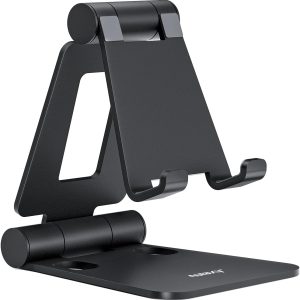
Full Aluminum Dual Folding Cell in aluminum. Part of the KiKi Living home organisation range. Free US shipping…
See also How to organise cables so you can unplug one without a hunt, and Cable boxes vs cable trays which suits a desk for the wider picture.
Frequently asked questions
- What holds a phone and tablet without taking desk space? A compact stand that cradles the device upright. It keeps the screen usable and fixes the charge cable in one spot.
- How do I stop the laptop brick pulling the socket? Rest the brick on a small tray or a velcro tab at the back corner so its weight is supported, not hanging off the plug.
- Are zip ties or velcro better for desk cables? Velcro. You will open them when a device changes; zip ties force you to cut and replace.
- Should chargers go on the desk or the floor? On the desk at a fixed dock for the device end; route only the slack down to a floor power strip.
- Why does my shared desk always look messier? Because nothing is anchored. Fix the chargers and docks first and the surface stays clear whoever sits down.